In an application, almost every action triggers a request that goes out over the network. The reflex is well known: you show a loading state the moment the action starts, then update it once the response comes back. The problem is that the duration of that response is fundamentally unknown and non-deterministic. And from this seemingly trivial detail springs one of the most widespread experience flaws on the web: a loading state that flickers, or that drags on forever.
The real problem: an unpredictable response time
When you naively wire a spinner to the “request in progress” state, you expose yourself to two symmetric bad scenarios, dictated by the actual latency of the call:
- Fast response: the spinner appears and disappears within a handful of milliseconds. The eye perceives a flicker: the page “jumps”, the interface trembles for nothing.
- Slow response: the loading component stays on screen for an indeterminate time, without the user knowing whether the application is still working or has frozen.
The result is an unstable, unpredictable UX: the same button, clicked twice in a row, can behave in two radically different ways depending on the mood of the network. The real question then becomes: how do you correctly handle a loading state whose duration, by definition, you don’t know in advance?
Making the loading state consistent with spin-delay
The first strategy doesn’t try to remove the loading state, but to make it consistent. The idea is to bracket the spinner’s display with two time thresholds, rather than tying it to the raw lifecycle of the request. A library like spin-delay implements exactly this behavior from two parameters:
- A delay before showing: the spinner only appears if the operation exceeds a certain duration. It’s generally considered that below 200 ms, the interaction is perceived as instantaneous and it’s pointless, even counterproductive, to display anything at all. This is what eliminates the flicker.
- A minimum display duration: once the spinner is shown, it stays visible for a floor amount of time, no matter what. This avoids the other form of flickering, when a response arrives just after the spinner has been triggered.
In concrete terms, on the React side, this amounts to deriving a “should we show the spinner?” boolean from the raw “is the request in progress?” boolean:
import { useSpinDelay } from "spin-delay";

function SaveButton({ isSaving }: { isSaving: boolean }) {
  // The spinner only shows if the operation exceeds `delay` (200 ms),
  // and then stays visible for at least `minDuration` (500 ms) to avoid
  // any flickering, whatever the actual network latency.
  const showSpinner = useSpinDelay(isSaving, {
    delay: 200,
    minDuration: 500,
  });

  return (
    <button disabled={isSaving}>
      {showSpinner ? <Spinner /> : "Save"}
    </button>
  );
}
Thanks to this approach, you offer a stable and predictable experience: genuinely fast operations trigger no spinner at all, and those that do trigger one display it long enough to remain readable. The behavior is consistent regardless of the loading duration, which is precisely what we were after.
Making the loading state disappear: the optimistic update
spin-delay makes the loading state bearable. But we can go further and try to make it disappear from the user’s perception. That’s the purpose of the optimistic update: updating the interface immediately, on the assumed hypothesis that the server-side action will succeed.
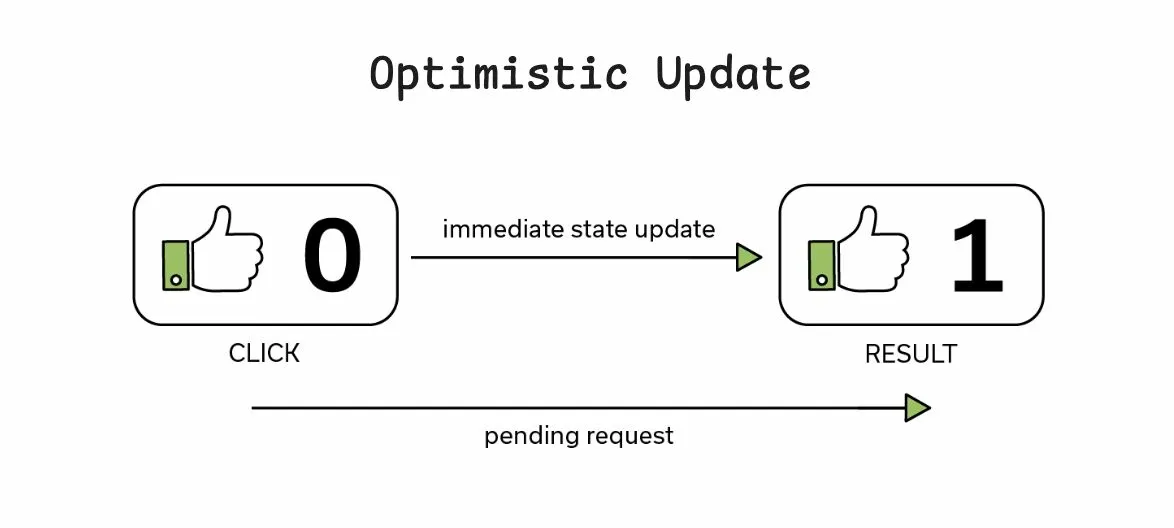
The UI is then no longer tied to a loading state at all: it immediately reflects the expected result, with zero perceived latency. The network request, for its part, keeps going out in the background. With React’s modern APIs, the pattern expresses itself very directly:
import { useOptimistic } from "react";

function LikeButton({
  likes,
  like,
}: {
  likes: number;
  like: () => Promise<void>;
}) {
  const [optimisticLikes, addOptimisticLike] = useOptimistic(
    likes,
    (current) => current + 1
  );

  async function handleClick() {
    addOptimisticLike(); // the UI updates immediately, 0 latency
    await like();        // the network request follows in the background
  }

  return <button onClick={handleClick}>Like · {optimisticLikes}</button>;
}
The benefit is obvious (instant loading, smooth experience), but it comes with a tradeoff you have to own. In case of a server-side error, the optimism backfires on you: the UI was showing a result that never actually happened. You then have to correct the update to reflect reality (revert / rollback) and give clear feedback to the user, or risk a deeply counterintuitive behavior. The optimistic update is therefore only relevant for actions with a high success rate and a low cost of failure: a like, a status change, adding an item to a list.
Going further: the local-first approach
You can see local-first as a generalization of the optimistic update, raised into an architecture rather than a one-off trick. The principle: you first save data locally, in the browser (hence zero latency) then synchronize it in the background with the server through a dedicated sync engine.
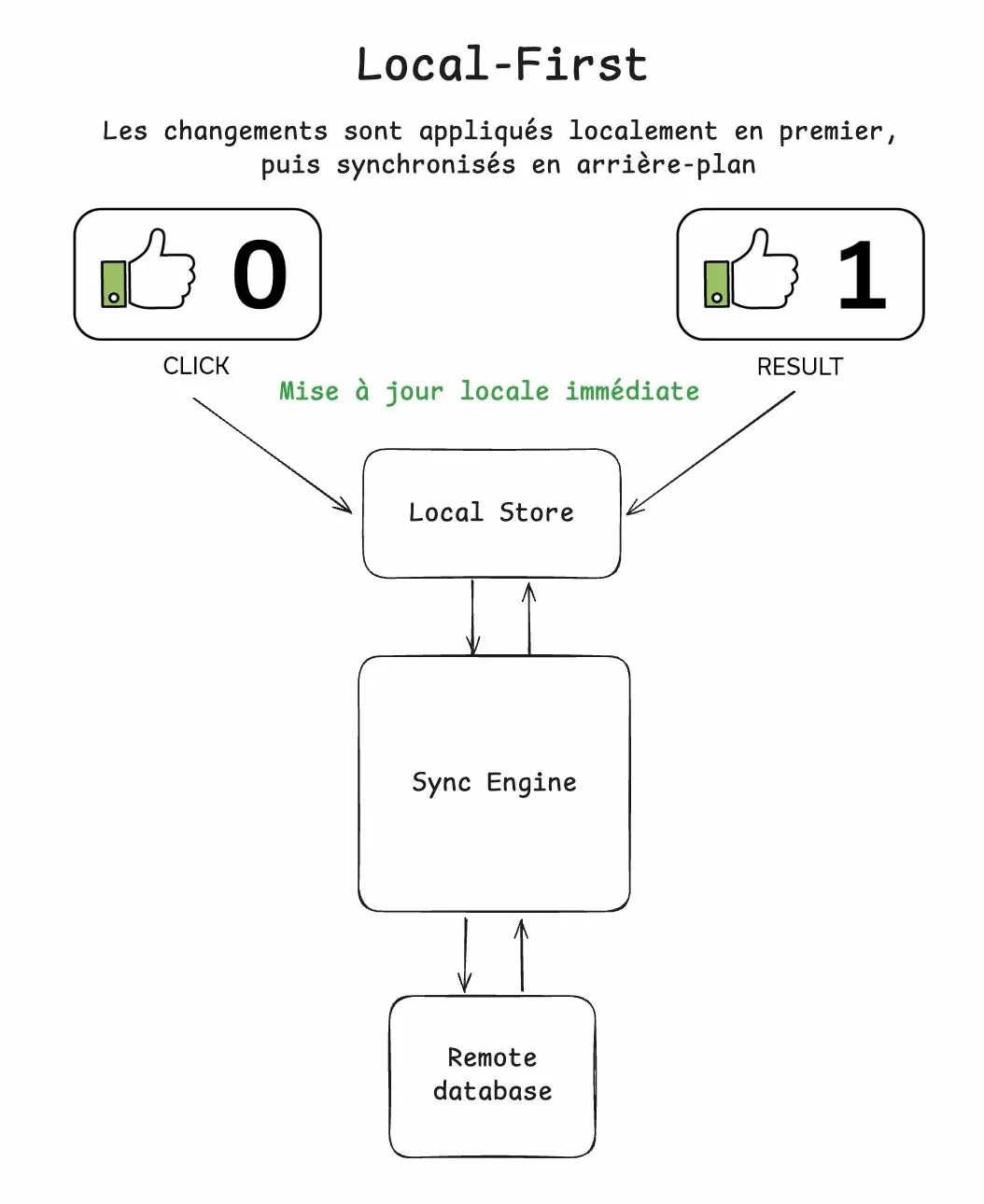
The reversal is significant. Where the optimistic update remains a patch applied to a particular UI state, local-first makes local storage the immediate source of truth of the application. The consequences match that ambition:
- Instant loading, by construction: every interaction reads and writes locally, without a network round-trip in the critical path.
- Offline operation: the application stays 100% usable even without a connection, with synchronization happening as soon as the network comes back.
The price to pay sits at synchronization time. In case of a conflict or an error, you have to reconcile after the fact the entire set of data the user interacted with, a far more demanding underlying problem than a simple localized rollback. It’s an architectural choice, not a mere display option: it commits the data model, the synchronization strategy and conflict handling.
In both cases, optimistic update as well as local-first, the perception is instantaneous, and the experience becomes smoother and faster, even though, underneath, the interactions with the server and their actual duration remain rigorously unchanged. We didn’t speed up the network; we stopped making the user wait on it.
Conclusion
Loading states are a detail too often handled by reflex, and one that ends up sabotaging the experience of an entire application. The rule fits in a single sentence: if you can’t avoid a loading state, at least make it consistent: that’s what spin-delay enables, by bracketing the spinner with a show delay and a minimum display duration.
And if you can, avoid it altogether by changing your UX strategy, or even your architecture: the optimistic update masks latency for actions with a high success rate, and local-first goes as far as making the browser the immediate source of truth. Three levels of ambition, one and the same goal: an interface that responds, rather than an interface that makes you wait.