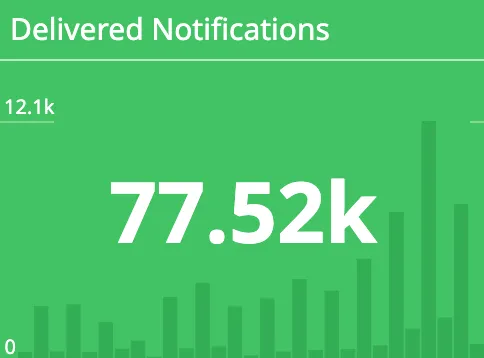
Nearly 80,000 push notifications sent in a single month, to more than 30,000 unique users, from an application built by our team at my current client. The number is impressive, but above all it hides a reality I underestimated for a long time: behind every notification that pops up on a phone screen lies a surprisingly long technical chain, one that crosses several systems you don’t fully control.
For a long time, I had no idea how push notifications actually worked on mobile applications. This feature, introduced as early as 2009 by Apple with the Apple Push Notification Service, sits today at the heart of product engagement strategies. On paper, the idea seems trivial: display a small message on a user’s phone. In reality, sending a push notification raises genuine challenges, both product and technical. And when you take the time to trace the full path, you discover a distributed system in its own right.
A product lever to wield sparingly
Before we even talk about the technical side, a push notification is first and foremost a product decision. It’s a direct channel, intrusive by nature: it interrupts the user in whatever they’re doing. That power is precisely what makes it a double-edged sword.
Well dosed, notifications are a formidable engagement lever: they bring the user back at the right moment, to the right action, with a contextual message. Poorly used, they become the best way to push someone into uninstalling the app, or, barely less final, into turning off all notifications in their system settings. Every notification you send must therefore serve a high-value action. The implicit rule is simple: if you’re hesitating about sending a notification, it probably means you shouldn’t send it.
Once that product discipline is in place, what remains is to understand how the notification actually travels, from the server to the screen.
Preparing the content
A notification isn’t born as a fixed message. It comes from the definition of a dynamic template, exactly like a transactional email or a server-rendered web page. This template carries several concerns that need to be handled before sending.
First, the title and the message contain placeholders, replaced during a rendering phase with information specific to the user: their first name, an order amount, a contact’s name. The template is therefore a blueprint, not a finished piece of content.
Next comes the question of translation: the content must be renderable in the user’s language. This means managing a set of translations per template and resolving the right locale at render time, just like any internationalized interface.
Finally, the notification carries a contextual redirect link: what happens on tap. A notification that leads nowhere, or that always sends you back to the home screen, wastes its potential. The deep link must take the user straight to the screen the message is about.
Sending to Android and iOS
Once the notification is prepared and rendered, it still has to reach the right device. This is where you leave the territory you control and start relying on third-party infrastructure.
You don’t talk directly to the user’s phone. You go through a messaging platform that interfaces with each vendor’s own push notification servers: the Apple Push Notification Service (APNs) on iOS, and Firebase Cloud Messaging (FCM) on Google’s side for Android. Firebase is often used as a single entry point, able to route to both worlds.
But this send is only possible if a prior step has taken place, on the mobile app side. On installation and first launch, the app must generate and register a unique association between the device it runs on and the messaging server. Concretely, the device obtains a token from the push service, and that token is reported back and stored on the backend. Without this token, the server simply doesn’t know who to send the message to.
This detail has important consequences: a token can expire, be invalidated after a reinstall, or change. Managing the lifecycle of these tokens (refreshing them, cleaning out the ones that are no longer valid) is an integral part of a robust notification system.
Reception on the device
The notification has travelled the entire path, crossed the messaging platform and the vendor’s servers. It faces one last barrier: the device’s operating system.
At this level, it’s all or nothing. If the user has refused notifications for the app, nothing gets through: the OS blocks it, no appeal. It’s a binary permission, granted or denied, and the app has no way to work around it.
Once permission is granted, responsibility shifts back to the app: it’s up to the app to expose a notification center that lets the user personalize their experience: choosing the categories they want to receive, muting marketing reminders while keeping critical alerts, and so on. The OS doesn’t provide this granularity: it’s the product’s job, and it often determines whether the user keeps notifications enabled rather than cutting everything off in one go.
In the end: a distributed system
When you put all these steps back together, the conclusion is inescapable: managing push notifications means managing a distributed system in its own right, made up of several services with distinct responsibilities, some of which are beyond your control.
- The CMS: creation of notifications and their content: templates, translations, placeholders.
- The backend application: the business logic for triggering. It’s the one that decides when and to whom to send, based on product events.
- The messaging broker: the sending service (Firebase, APNs) that integrates with Google’s and Apple’s servers and relays the notification all the way to the device.
- The native application: handling the opening, the notification preferences, and the integration with the messaging platform (generating and reporting the token).
Each link can fail independently: a badly rendered template, an expired token, a quota exceeded on the broker side, a permission denied on the OS side. Thinking of notifications as a distributed system means accepting that delivery is never guaranteed end to end, and designing accordingly: retries on the broker side, monitoring deliverability rates, cleaning up dead tokens.
Conclusion
What looked like nothing more than a small message on a screen turns out to be the culmination of a chain crossing a CMS, a backend, a messaging broker, Apple’s or Google’s servers, the phone’s OS, and finally the native application. Each step carries its own challenges, product and technical alike, and every boundary between systems is a potential point of failure.
The next time a notification pops up on your phone, you’ll know the path it travelled to get there.